How to Cancel NordVPN and Get a Refund (Web, iPhone, Android)
To cancel NordVPN bought on its website, log in to your Nord Account, open the Billing tab and click cancel next to auto-renewal. That stops the next charge, but it is not a refund: money back comes only from a separate request, and only within 30 days of your first payment. If you paid through Apple, Google Play or Amazon, none of this happens in your Nord Account; you cancel and claim inside that store.
This guide puts all three purchase routes side by side, with the rules NordVPN, Apple and Google publish, read on 9 October 2026. It is for anyone who wants out, wants their money back, or just wants to stop an automatic renewal they did not plan for. If you are happy with the service and only object to the renewal price, skip to the last section.
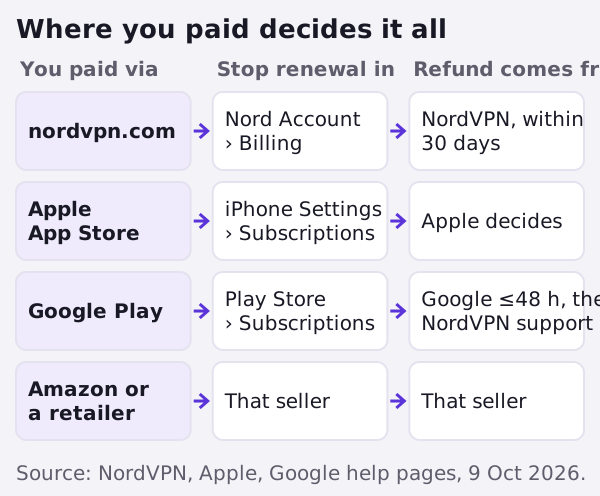
Cancel in two minutes (website purchase)
Most people buy on nordvpn.com, and for them cancelling is a short click path. NordVPN's support article lists it like this:
- Log in to your Nord Account (the same login the app uses).
- Open the Billing tab.
- Click cancel next to auto-renewal.
- Choose cancel auto-renewal to confirm.
- Check that the auto-renewal status now reads Off, and look for an email titled along the lines of "You've cancelled auto-renewal".
The same screen handles NordPass, NordLocker, a Dedicated IP add-on and bundles, so if you bought extras, switch each one off rather than assuming the VPN toggle covers them. One honest caveat: NordVPN's article says the subscription will no longer renew at the next billing date, but it does not spell out whether you keep using the app until that date. Plan around the renewal date itself, and if you also want a refund, ask for it before you rely on access running out.
On a free trial started at checkout, the path is slightly different. NordVPN says to go to Nord Account, then Billing, then Subscriptions, and press Cancel next to the line marked "Free trial". The trial lasts 7 days, applies only to selected 1- and 2-year plans, needs a card or PayPal, and turns into a paid plan automatically. NordVPN emails a reminder before that happens, but the safest move is to cancel the day you decide, not the day the email lands.
Getting the refund: the 30-day rule and what it covers
Stopping the renewal and getting money back are two separate requests. NordVPN's refund policy, read 9 October 2026, gives a 30-day money-back guarantee on new subscriptions only. It applies to your initial purchase; once a subscription has renewed, that renewal is no longer covered, unless local law says otherwise. A payment older than 30 days is out, and so is a second refund if your first payment was already refunded once.
The request runs through live chat, found at the bottom of NordVPN's support pages. NordVPN describes the steps as: start a chat, receive a link, verify your identity, pick the payment marked "Refund", give a reason and confirm the summary. A confirmation email follows. There is also an email form, with a reply promised within 24 hours. After approval the status shows "Refund Processing" for up to about four hours and then "Refunded"; NordVPN says the money itself can take up to 10 business days to arrive, depending on how you paid.
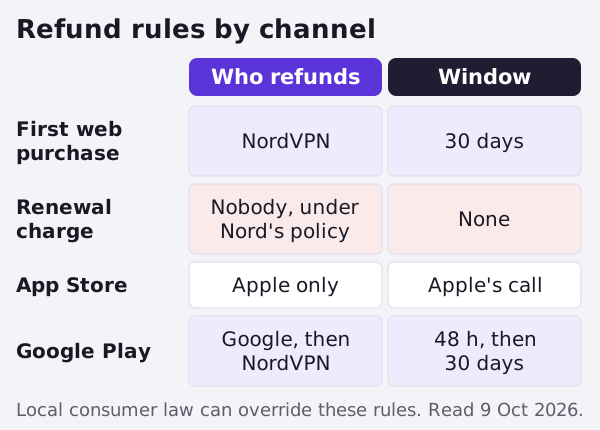
Cancelling auto-renewal does not trigger a refund, and asking for a refund is a separate step. If you want your money back, do both, and do them inside the 30 days.
Bought on iPhone? App Store steps and refunds
If the charge on your statement says Apple, NordVPN cannot help with the money. Its refund page says plainly that it is unable to issue refunds for App Store payments. Cancellation also happens on Apple's side. On an iPhone or iPad, Apple's steps are: open Settings, tap your name, tap Subscriptions, choose NordVPN and tap Cancel Subscription. Apple adds that if you see no Cancel button, or a red message showing an expiry date, the subscription is already cancelled.
For the refund, Apple routes requests through reportaproblem.apple.com: sign in, choose "I'd like to", pick "Request a refund", give a reason, select the NordVPN charge and submit. Apple says to expect an update within 24 to 48 hours. It does not set a fixed deadline for asking and does not promise a yes; eligibility varies by country and by purchase. In practice, the sooner you ask after the charge, the stronger your case looks. Note too that NordVPN's own trial article describes a web trial and a Google Play trial, not an App Store one, so an Apple charge is normally a paid purchase from day one.
Bought on Android? Google Play steps and refunds
Google Play purchases sit in the middle. To cancel, open the Play Store, go to Subscriptions, select NordVPN and tap Cancel subscription. Google states that you keep the subscription for the time you have already paid for, so cancelling early does not cut you off mid-month.
Refunds have two stages. Within 48 hours of the payment, you can ask Google directly; its help centre points you to play.google.com, then your profile, Payments & subscriptions, Budget & order history, and Report a problem, and says a refund may be possible depending on the purchase details. After 48 hours, Google tells you to contact the developer. Here NordVPN differs from Apple: its policy says refunds for Google Play payments can be requested through NordVPN's customer support, under the same 30-day terms as a website purchase.
Android also carries its own trial. NordVPN offers a separate 3-day free trial to first-time Android users who install from Google Play, except in Bangladesh, India, South Korea and Sri Lanka. That trial is cancelled in Google Play, not in your Nord Account, and three days is short, so set the reminder before you install.
Amazon, gift cards and retail boxes
Bought through the Amazon Appstore? NordVPN's policy sends you to Amazon. Bought a code from an electronics store, an online shop or a marketplace seller? Then the retailer handles any refund, and NordVPN tells you to contact them directly. If you are not sure which route you used, the first payment email or your card statement usually names the merchant: NordVPN, Apple, Google or someone else. That one word tells you which section of this page applies.
| Bought via | Where you cancel | Who refunds | Refund window |
|---|---|---|---|
| nordvpn.com | Nord Account › Billing › cancel auto-renewal | NordVPN (live chat or email form) | 30 days from first purchase; renewals excluded |
| Web free trial | Nord Account › Billing › Subscriptions › Cancel next to Free trial | No charge if cancelled in time | Trial lasts 7 days |
| Apple App Store | iPhone Settings › your name › Subscriptions | Apple only | No fixed deadline; Apple decides |
| Google Play | Play Store › Subscriptions | Google within 48 h; then NordVPN support | 48 h via Google, then NordVPN's 30 days |
| Amazon Appstore / retailer | With that seller | Amazon or the retailer | That seller's rules |
Edge cases worth checking before you click
- You were charged for a renewal you forgot. NordVPN's policy excludes renewals from the 30-day guarantee. Cancel auto-renewal at once so it cannot happen again next year, then check whether your local consumer law gives you a cooling-off right; NordVPN's wording allows for that.
- You already had one refund. NordVPN will not refund a second time if an initial payment was refunded before. Buying again and cancelling again does not reset the clock.
- You paid with crypto, a gift card or cash in a shop. The refund route depends on that method or seller. Retail purchases go back to the retailer.
- The automated answer says no and you think it is wrong. NordVPN's refund page says you can ask live chat to review the decision.
A last check that saves arguments: take a screenshot of the Billing tab showing auto-renewal as Off, and keep the confirmation email. If a charge appears anyway, that record is what support, your bank or the app store will want to see first.
If you just want a cheaper NordVPN renewal
Plenty of people searching how to cancel NordVPN do not dislike the app; they dislike the renewal invoice. NordVPN's own renewal table, last updated 10 June 2026 and read 9 October 2026, lists US renewals at $139.08 a year for Basic (about $11.59 a month) and $219.48 a year for Complete (about $18.29 a month), before tax. Prime, the top plan sold to new US buyers, renews at $296.28, and older tiers still sit in that table as well, with Plus renewing at $179.88. NordVPN says it may A/B-test renewal prices and that it emails you before a price change, so the number in your own account is the one to trust.
Compare that with what new buyers see. NordVPN's US pricing page listed Basic on a 2-year plan at $3.49 a month as of 12 October 2026, which works out at $94.23 for the first 27 months before tax. Checkout prices differ by country and move often, so trust the total in your own cart. The gap is the whole story of VPN pricing: the intro rate is for the first term only. Our explainer on how VPN pricing works walks through the mechanics.
Ways to pay less without breaking any rules, all from NordVPN's own "get NordVPN cheaper" support page: an additional discount for students and apprentices aged 18 to 26; a free month for each friend you refer; and seasonal Black Friday and Cyber Monday deals. A simpler move is to switch auto-renewal off now, so the decision waits for you rather than your card. Near the end of your term, compare the renewal line in your account with the price a fresh plan costs that week, including tax.
If NordVPN is still the service you want, you can check NordVPN's current plans (affiliate link; it never changes what we write). If the money matters more than the brand, our list of cheap VPNs ranked by their real cost after renewal shows which providers renew gently and which do not.
Common questions
How do I cancel my NordVPN subscription?
Does cancelling NordVPN give me a refund?
Can I get a NordVPN refund after 30 days?
How do I get a refund if I paid through the App Store?
How long does a NordVPN refund take?
Affiliate link. We may earn a commission — it never moves a ranking.
Weigh this against the whole field: see what cheap VPNs really cost over time, or read how VPN free trials and money-back guarantees actually work.